Systems | Development | Analytics | API | Testing

Making the Most of Your Logs in Rails

Rails logs through Rails.logger — on Rails 8.1, a BroadcastLogger that writes tagged lines to STDOUT in production and to log/development.log in development. Six levels exist: debug, info, warn, error, fatal, and unknown; production defaults to info via RAILS_LOG_LEVEL. Good log messages are descriptive, carry context like request IDs, and become structured JSON when machines read them.
Observability Never Really Shifted Left

We made software development faster. Now we need to make validation faster, too. For the last decade we have shifted development left. Testing, security, performance, and CI/CD all moved closer to the developer. Observability mostly did not. It still starts after deployment (we covered the incident side of this in Your Observability Stack Found the Fire), which means the people writing the code rarely have meaningful production behavior to observe while they build.
Sponsored Post

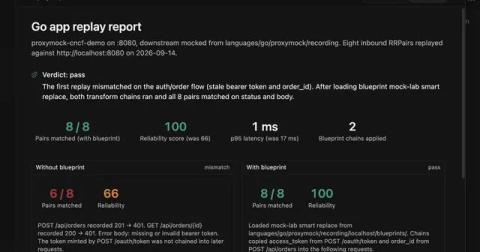
Use AI and traffic replay to test AI-generated code

When I ask an AI agent to change code, I also want it to run the application and test what it changed. Asking it to write some tests is a start. But if it invents the expected responses from the same assumptions it used to write the code, those tests can miss the same mistake. Traffic replay gives the agent something concrete to test against: requests and responses captured from a working application. The agent can run those requests against its changes, inspect the differences, and repeat the test after a fix. I can open the same results and check its work.

Make React Native builds 4x faster with fingerprint-based caching on Bitrise

Build tools have relied on it for years to avoid redoing work that hasn't changed. In React Native CI it's still a bit of a secret sauce: a fingerprint-based caching technique that can make your builds several times faster, yet one that surprisingly few teams have switched on. The premise is simple: most of the time you're only changing JavaScript, so most of the native modules are reusable.

How Snowflake's Paid Media Team Cut Reporting From a Week to Hours | AI Blueprint for Go-To-Market

Mariam el Baghdady (Manager, Digital Marketing, Snowflake) shows how AI changed two of her most time-consuming tasks: weekly performance reporting and quarterly forecasting across 20+ countries. The old reality: spending hours formatting data just so she could talk about it. Now a weekly HTML report in CoCo flags what needs attention across channels and regions in minutes, and a forecast that used to take nearly a full week turns around in a fraction of the time. She also shares how she got there with no technical background whatsoever.

Is Your AI Running Wild? #podcast #news #techshort #cloudsecuritypodcast

Is hands-off AI adoption turning your business into the "Wild West?" Handing out credit cards for unlimited tokens without proper guard rails is a recipe for failure. Discover why establishing best practices and security rails is essential as AI agents transform the enterprise.

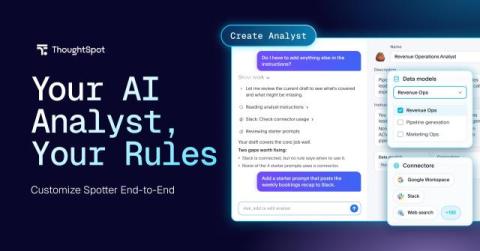
Build an AI Analyst Your Team, or Your Customers, Can Trust

You can get an AI Analyst from most of the players, or you can try to build one yourself. Fewer let you decide what it knows, what it can touch, and who can use it. And even fewer still let you define what it won't do. You need all three before you hand one to a team or put one inside your product. In most of the product experiences, your AI analyst's context had two homes: one expert's head, or org-wide instructions.

How to Install Claude Code on Windows with PowerShell (Step by Step) #Shorts #aicoding #claudecode

How to install Claude Code on Windows using the official PowerShell installer, step by step. Claude Code is Anthropic’s AI coding assistant for the terminal. This tutorial shows how to find the official instructions, run the PowerShell installer, handle the PATH setup note, launch Claude Code and sign in. WHAT YOU NEED You do not need to run PowerShell as Administrator. INSTALLATION STEPS Search “Claude Code terminal” and open the official result from code.claude.com. Find the Windows PowerShell installation command and copy it.

The Future of Software Testing: Why This Conversation Matters Right Now

AI is no longer on the horizon. It is already reshaping how software is built, tested, and released, and it is moving faster than most quality processes were designed to absorb. Developers are shipping AI-written code at speed. Test teams are generating test cases, maintaining suites, and triaging defects with AI. But speed cuts both ways. AI magnifies the process it enters. Strong quality practices can become faster and more scalable.

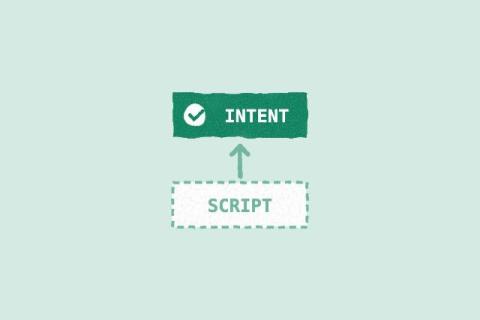
Keep the Intent. Throw Away the Script.

I'll give you the takeaway from this blog right now: the part of a test worth keeping is what it's meant to prove, not the script that proves it. Scripts have become cheap to generate, so we should stop treating them as something precious to maintain. Keep the intent. Throw away the script. Last time I wrote that the first time an AI agent runs a manual test case, it can leave an automated test behind, and every later run can use that script instead of the natural-language steps.