Systems | Development | Analytics | API | Testing

The latest News and Information on Software Testing and related technologies.

Top 10 Selenium Exceptions and How to Handle Them

Automation testing has become an essential part of software development. One of the most widely used tools in this domain is Selenium. However, as with any programming framework, Selenium comes with its own set of challenges, particularly when it comes to exceptions. This guide will explore the top 10 Selenium exceptions, how to handle them effectively, and why understanding these exceptions is crucial for every automation tester.

Regression Testing Best Practices: Risk Management Guide 2025

Picture this: You’ve just deployed a new feature at work, and you’re buzzing with excitement. But suddenly, you hear whispers of a critical bug in the old functionality. That gut-wrenching moment reminds us how important it is to address regression testing. In this post, we’ll delve into the legacy views of regression testing, explore its modern implications, and highlight why risk management is the real MVP in ensuring robust software development.

CSS Selectors in Selenium Explained (with Examples)

One of the most important tasks when automating web applications using Selenium is locating elements efficiently. CSS Selectors are one of the most powerful and preferred ways to locate elements due to their speed and flexibility. They provide a concise syntax to identify elements based on their attributes, relationships, and hierarchy. Unlike XPath, which can be more complex and slower in certain scenarios, CSS Selectors offer a streamlined approach to element selection.

Sauce Labs Community Office Hours: Troubleshooting Test Results - Solving Failures with Confidence

Struggling to make sense of test failures? In this Sauce Labs Community Office Hours session, we’ll walk you through practical troubleshooting techniques to help you quickly identify root causes, resolve issues efficiently, and boost the reliability of your automated test suite. Learn how to approach test failures with confidence and keep your automation running smoothly.

Get Real-Time Visibility into Your Apps with Performance Notifications & Alerts

Understanding the overall performance and speed of your app is just as important as avoiding crashes and bugs. SmartBear Insight Hub now includes performance targets to set and track specific benchmarks for your application’s performance metrics. This update allows you to define what “good performance” means for your app, whether it’s fast screen loads, efficient network requests, or quick app startups.

Using JavaScriptExecutor in Selenium for Enhanced Browser Automation

JavaScriptExecutor executes JavaScript code directly within the browser. Using JavaScriptExecutor in Selenium, testers can perform advanced automation tasks like scrolling, clicking hidden elements, handling alerts, and manipulating the Document Object Model (DOM). This makes it an important tool for improving browser testing features. Read further to learn more about the basics of JavaScriptExecutor in Selenium, their use cases, working methods, benefits, etc.

Page Object Model and Page Factory in Selenium (Java)

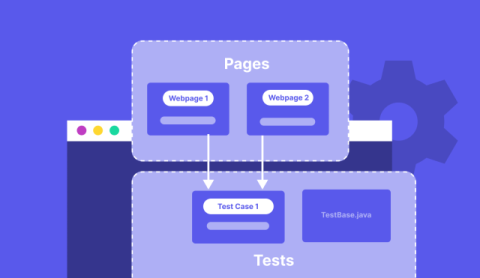
In Selenium test automation, managing test scripts efficiently is important for improved scalability, readability, and maintainability. The Project Object Model (POM) is a design pattern that improves the structure of automation scripts by creating a separate class for each web page in an application. Page Factory is a more advanced version of POM that further simplifies object repository management.

Streamlining QA with functional and performance testing integration

Join Danielle Forier, Software Quality Assurance Analyst, as she shares the journey of how her QA team transformed their testing strategy by integrating functional and performance testing. Discover how reusable scripts and the right tools helped them achieve seamless workflows, greater efficiency, and the scalability needed to manage a growing and complex product portfolio.